
Non classé
How to Create a Child-Friendly Gaming Setup in 2025: Safe, Smart & Super Fun
Mai
Introduction
In a digital world where gaming is part of everyday life, ensuring your child has a safe and age-appropriate child-friendly gaming setup has never been more important. Kids today aren’t just playing; they’re learning, bonding, and exploring virtual spaces that can shape their imagination and skills.
Creating a child-friendly gaming setup is more than just plugging in a console. It’s about combining comfort, security, and fun in a way that supports your child’s development and keeps your peace of mind intact. Whether your little one is new to gaming or already a Minecraft wizard, this guide will help you build the perfect gaming space tailored just for them.
Benefits of a Child-Friendly Gaming Setup
Let’s start with why this matters. A thoughtful setup brings huge advantages:
- ✅ Safety first: Protected from eye strain, hearing damage, and inappropriate content.
- ✅ Healthy habits: Encourages breaks, balance, and good posture.
- ✅ Improved learning: Educational games and structured screen time foster development.
- ✅ Family bonding: A cozy, inclusive space means you’re invited too.
- ✅ Long-term value: A good setup grows with your child, saving money in the long run.
Understand Your Child’s Gaming Needs
Before buying a single cable, ask:
- 🎮 What genres does your child enjoy? (Adventure, puzzles, racing?)
- 📅 How often do they play?
- 🧠 Are they more interested in creativity (like building in Roblox) or competition (like Fortnite)?
Knowing their style ensures you make choices that match their interests and maturity level.
Choosing the Right Gaming Platform
Different ages and personalities benefit from different systems:
| Age Group | Best Platform |
|---|---|
| 4–7 years | Tablet, Nintendo Switch Lite |
| 8–12 years | Nintendo Switch, Xbox Series S |
| 12+ years | PC or PS5 (with parental controls) |
💡 Tip: Tablets are portable and simple. Consoles offer safer ecosystems. PCs are more flexible but require more monitoring.
Selecting Age-Appropriate Games
Use these trusted rating systems to guide your choices:
- ESRB (North America) – E for Everyone, E10+, T for Teen
- PEGI (Europe) – 3, 7, 12, 16, 18
📚 Top child-friendly games in 2025:
- Minecraft
- Animal Crossing: New Horizons
- Lego Star Wars: The Skywalker Saga
- Mario Kart 8 Deluxe
- Roblox (with filters and monitoring)
🚫 Avoid games with chat features unless you can monitor or restrict them.
Essential Hardware for Kids
Comfort, durability, and simplicity are key. Here’s your shortlist:
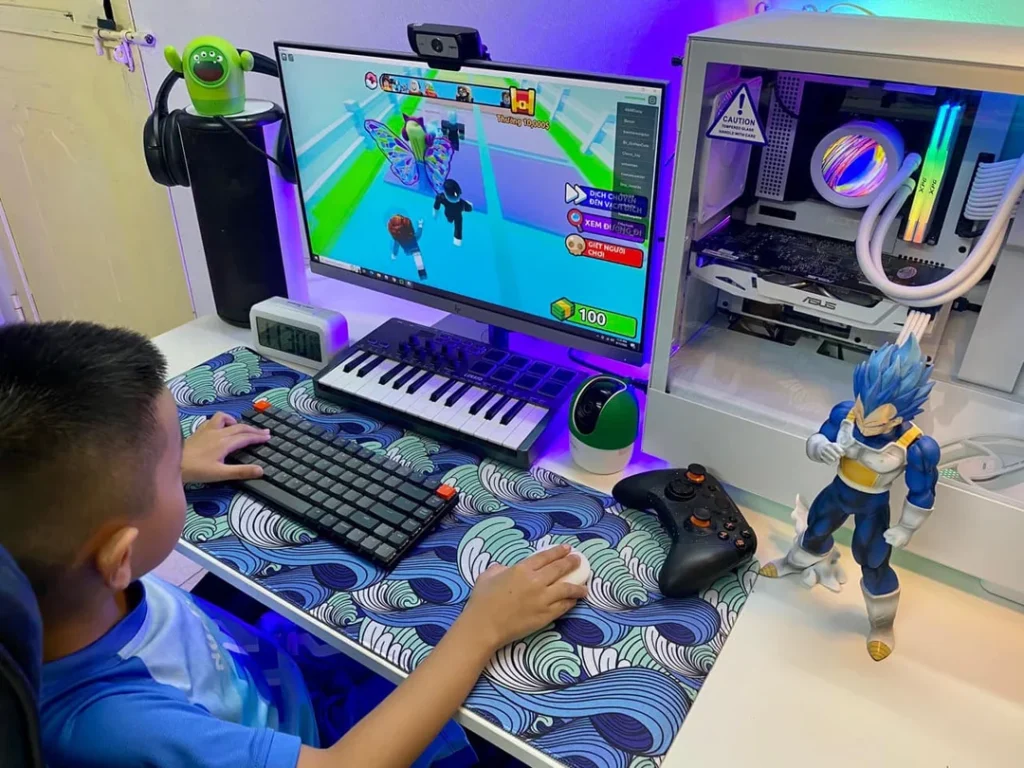
- Compact gaming keyboard with low actuation force
- Light gaming mouse (wired for safety)
- Anti-fatigue mouse pad
- Monitor with blue light filter and height adjustability
Avoid overcomplicated gear. Fewer buttons = less confusion.
Best Monitors for Young Eyes
Children’s eyes are still developing, so prioritize:
- Eye-care certified displays (TÜV, low-blue light)
- 1080p resolution for clarity
- 75Hz to 120Hz refresh rate to reduce screen tearing
- 24-inch size is ideal for close-up play
🛑 Avoid ultra-wide or 4K monitors—they strain the eyes and aren’t necessary.
Safe Gaming Furniture
Forget adult-sized racing chairs. Focus on:
- ✅ Adjustable kids’ chairs with lumbar support
- ✅ Footrests for posture
- ✅ Rounded-edge desks at proper height
- ✅ Anti-slip mats under chairs
A good chair prevents back pain and teaches good sitting habits.
Headphones for Kids
Loud sound damages ears—permanently. Choose:
- Volume-limiting headphones (max 85 dB)
- Over-ear design for comfort
- Wireless with parental volume lock
🔊 Check for “Safe Audio for Kids” labels.
Controllers Designed for Small Hands
Standard controllers are often too bulky. Try:
- Nintendo Switch Joy-Cons
- 8BitDo Lite SE
- PowerA Mini Controllers
Make sure they’re lightweight, textured, and responsive.
Setting Up Parental Controls
Every modern device offers protection tools:
- Nintendo: Use the Parental Control mobile app
- PlayStation & Xbox: Family settings for time limits, spending, online access
- PC (Windows 11): Use Microsoft Family Safety
- Steam: Family View for content and playtime control
🛡️ Set up PIN codes, spending limits, and screen time boundaries.
Scheduling Screen Time Wisely
The American Academy of Pediatrics recommends:
| Age | Daily Limit |
|---|---|
| 2–5 | 1 hour |
| 6–12 | 1–2 hours |
| 13+ | 2–3 hours (with breaks) |
✅ Use apps like Google Family Link or Qustodio to track and enforce playtime.
Creating a Distraction-Free Environment
A well-placed gaming space keeps focus high and stress low:
- Position the desk away from the bed (avoid mixing rest and play)
- Use soft lighting to reduce glare
- Keep toys and non-gaming items organized
- Avoid open wires or sockets within reach
🧠 Less clutter = more focus and fewer accidents.
Decor & Vibe: Make it Kid-Friendly
Let them personalize the space:
- LED light strips with RGB presets
- Wall posters or decals of their favorite games
- Theme-based accessories (Minecraft, Pokémon, Mario)
🎨 Creativity turns the setup into a space they love—and respect.
Online Safety for Children
Online gaming comes with real risks. Protect your child by:
- Turning off voice chat or limiting it to friends
- Using whitelisting for online friends and games
- Teaching them not to share personal info
💬 Encourage open communication about what they see online.
Gaming and School Balance
Create physical zones:
- Gaming zone for fun and play
- Homework zone nearby but separate
Use visual cues like colored mats or desk dividers. And yes, rewards work: finish homework, earn game time.
Teaching Digital Responsibility
- Explain what microtransactions are and how they work
- Set clear rules about in-game spending
- Reward respectful in-game behavior
📱 Use examples they understand. “Would you buy candy from a stranger without asking?”
Multiplayer: Friends and Family Play
Some of the best memories happen when you play together. Choose games with:
- Couch co-op or split screen
- Parental participation
- Shared achievements
Try:
- Overcooked! 2
- Super Mario Party
- Moving Out 2
- LEGO Brawls
Encouraging Educational Gaming
Gaming doesn’t have to mean zoning out. Try:
- Prodigy Math Game
- Tynker and Scratch for coding
- Zoombinis for logic
- Kerbal Space Program for physics
Make it a mix of fun and functional!
Organizing the Setup
Nothing screams chaos like tangled cables and scattered accessories:
- Use Velcro ties or cable sleeves
- Add labelled bins or drawer organizers
- Keep chargers in a dedicated charging station
🧽 Make cleaning part of the routine—kids love using their own wipes!
Cleanliness and Hygiene
- Use alcohol-free wipes on shared gear
- Set a rule: wash hands before gaming
- Teach them to log out and shut down properly
🧼 This helps avoid both germs and fried circuits.
Accessibility Options
For children with special needs:
- Xbox Adaptive Controller
- One-handed controllers (e.g., 8BitDo Single Stick)
- Voice-controlled apps
- Adjustable monitors and desks
🎗️ Inclusion is essential—technology is a tool for all.
Tech Tools for Healthy Habits
Support screen time without overuse:
- Blue light glasses to protect their eyes
- Focus timers (Pomodoro method)
- Smart lamps with automatic dimming
These small upgrades make a big impact on health and routine.
Affordable Gaming Accessories for Kids
Budget gear that’s kid-approved:
- Redragon K552 (mechanical keyboard under $50)
- Logitech G203 LightSync (RGB mouse)
- ONIKUMA Gaming Headset (volume-limited)
🤑 No need to spend $200 on a headset they’ll outgrow in a year.
Creating a Setup That Grows with Them
Think long-term:
- Adjustable chairs and desks
- Modular PC builds
- Wireless accessories they can re-use
🎁 Gift upgrades on birthdays to keep the setup evolving with them.
Involving Your Child in the Setup Process
Make it a family project!
- Let them pick colors, themes, accessories
- Explain how the tech works
- Show them how to safely plug and unplug gear
This builds both confidence and responsibility.
Real-World Examples & Inspiration
- Pinterest: “Kids Gaming Desk Ideas”
- Reddit: r/battlestationskids
- YouTube: “Tiny Gamer Setup Tours”
- IKEA hacks for themed furniture
📸 Create a vision board with your child before shopping.
Conclusion: Empowering Kids Through Smart Gaming Setups
Creating a child-friendly gaming setup is about more than tech. It’s about building a safe, respectful, and fun digital environment that grows with your child.
You’re not just raising a gamer. You’re raising a responsible digital citizen.
So grab a mouse, roll up your sleeves, and make gaming a family-friendly experience that builds memories—not stress.
FAQ – Child-Friendly Gaming Setup
How much screen time is safe for kids?
1–2 hours daily with breaks is ideal, depending on age.
What’s the safest console for kids?
The Nintendo Switch is widely considered the most kid-friendly.
How do I prevent in-game purchases?
Use parental controls to block spending or require PIN authorization.
Is PC gaming okay for kids?
Yes, with proper content filtering and time limits.
What’s a good first headset for a child?
Try volume-limiting headphones like Puro BT2200 or ONANOFF BuddyPhones.
Can kids game and still do well in school?
Absolutely—if you set clear boundaries and encourage balance.
